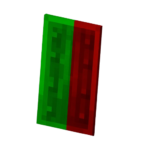
Shield Indicator
Shield Indicator is a texture pack that visually communicates your shield's status in real time during gameplay. It displays whether your shield is actively blocking, ready for use, or recovering from cooldown, helping you respond quickly in combat situations. The indicator changes colors to represent each state clearly on your screen.
Installation
Download the texture pack file and import it into your Minecraft Bedrock Edition resource packs folder. Then, activate it from the Resource Packs menu within the game settings before starting your world or server.
How to use
Once the texture pack is enabled, the shield status indicator will appear automatically on your screen during gameplay. It updates in real time as your shield state changes.
Requirements / Compatibility
This texture pack is designed for Minecraft Bedrock Edition and works with versions that support custom resource packs and HUD modifications. Ensure your game is updated to a compatible version for proper functionality.
Key features
- Green indicator: Shield is actively blocking incoming attacks.
- Normal (white) indicator: Shield is ready but not currently in use.
- Red indicator: Shield is on cooldown and temporarily unavailable.

