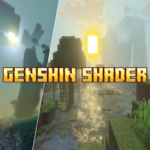
Genshin Shader
Genshin Shader (Zephyr) transforms your Minecraft Bedrock world with visuals inspired by Genshin Impact. This shader enhances environmental effects to create a dynamic and immersive experience, featuring calm nighttime atmospheres and distinctive water patterns that resemble those seen in Genshin Impact. It is designed to bring a fresh, vibrant look to your gameplay.
Installation
To install the Genshin Shader (Zephyr), place the shader pack file into your Minecraft resource packs folder. Then, activate it from the resource packs menu within the game settings.
How to Use
After enabling the shader pack, ensure that the "Vibrant Visuals" option is turned on in your game settings to fully activate the shader's effects. This setting is essential for experiencing the enhanced lighting, water reflections, and atmospheric changes.
Requirements / Compatibility
This shader is compatible with Minecraft Bedrock Edition. Make sure your device supports shader packs and has sufficient graphics capabilities to run enhanced visual effects smoothly. It is recommended to use the latest version of the game for best performance.
Key Features
- Dynamic lighting and shading that emulate the style of Genshin Impact.
- Calm and immersive night environments with enhanced atmospheric effects.
- Water surfaces display patterns and reflections reminiscent of Genshin Impact's aesthetics.
- Overall vibrant and colorful visual enhancement to the Minecraft world.


 1.50/5