BS Shader
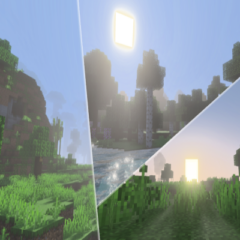
🔥 BS Shader (Zephyr) enhances your Minecraft world with a realistic, RPG-inspired atmosphere that feels dynamic and immersive. This shader transforms your gameplay environment by adding vivid ocean-blue skies, deep blue waters, and lifelike shadow effects, giving your world a warm and lively appearance. Activate vibrant visuals to experience the full effect of this shader.
Installation
To install BS Shader (Zephyr), download the shader pack and import it into your Minecraft Bedrock Edition texture packs. Once imported, enable it through the in-game settings to apply the shader effects to your world.
How to use
After enabling the shader pack in your resource packs, make sure to turn on the "Vibrant Visuals" option in your video settings. This setting is necessary to activate the full range of colors and lighting effects BS Shader (Zephyr) provides.
Requirements / Compatibility
BS Shader (Zephyr) is designed for Minecraft Bedrock Edition and requires a device capable of handling enhanced graphical effects. For the best experience, ensure your device supports vibrant visuals and has sufficient performance to run shader packs smoothly.
Key features
- Realistic ocean-blue sky that enhances the game's atmosphere.
- Deep blue water with natural-looking reflections and shading.
- Dynamic shadows that add depth and realism to the environment.
- Warm and vivid color palette that makes the world feel alive.
- Inspired by RPG-style visuals to enhance role-playing gameplay.

