Nebula PvP Realism 64x
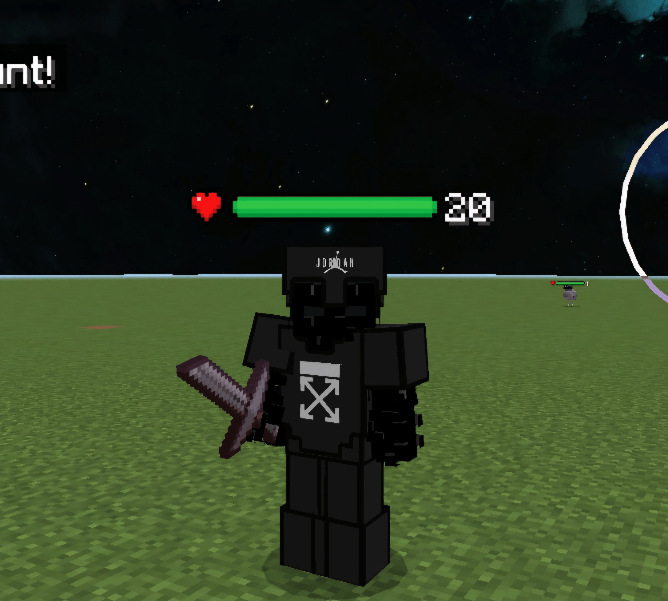
Nebula PvP Realism 64x is a refined PvP resource pack that blends realistic design with a vibrant red nebula theme. It offers detailed textures for armor and tools while preserving the classic Minecraft look, providing a clean and visually appealing experience. With 64x resolution, this pack enhances clarity and smoothness, making it ideal for players seeking a balance between aesthetics and functionality during combat.
Installation / How to use
To install the Nebula PvP Realism 64x pack, download the resource pack file and place it into your Minecraft "resource_packs" folder. Launch Minecraft, navigate to Settings > Storage > Resource Packs, and activate the Nebula PvP Realism 64x pack. Make sure it is prioritized above other packs to ensure all textures load correctly.
Requirements / Compatibility
This pack is compatible with Minecraft Bedrock Edition and optimized for 64x resolution. It works best on devices that support higher texture resolutions without performance issues. It does not alter gameplay mechanics, so it can be used alongside most other mods and add-ons without conflicts.
Key features
- Clean and realistic PvP textures with a distinctive red nebula theme
- Detailed armor and tool designs, including vibrant diamond and darker netherite textures
- Smooth 64x resolution for enhanced visual clarity during battles
- Maintains the vanilla Minecraft style for familiarity and ease of use
- Polished interface elements to complement the overall aesthetic
Notes / Troubleshooting
If textures do not appear correctly, verify that the pack is enabled and prioritized in the resource pack list. Restart Minecraft after installation for best results. Ensure your device supports 64x texture packs to avoid performance slowdowns.