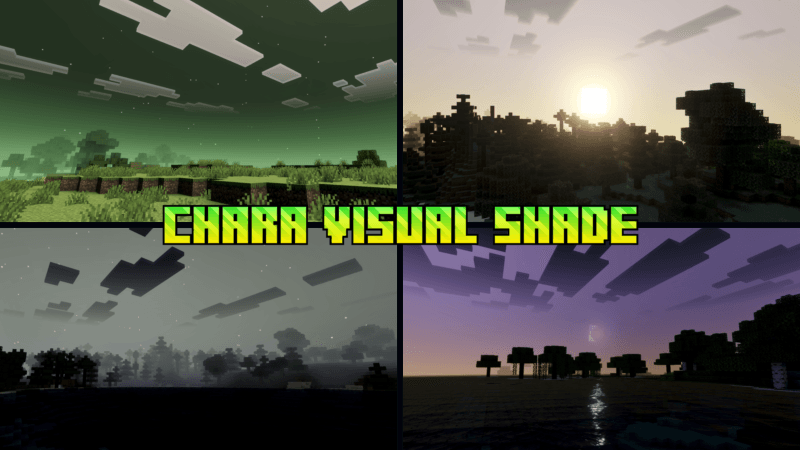
Chara Visual Shade
Chara Visual Shade is a custom shader pack tailored for fans of Undertale, designed to enrich your Minecraft Bedrock Edition experience with unique visual effects. It features advanced rendering techniques such as Physically Based Rendering (PBR), ACE tone mapping, and precise white balance adjustments to create complex midtones. This shader brings a distinct Chara-inspired aesthetic, enhancing nighttime exploration and monster hunting with specialized visual enhancements.
Installation / How to use
To install Chara Visual Shade, download the shader pack file and import it into your Minecraft Bedrock Edition resource packs. Enable it from the Settings menu under Global Resources. Once activated, launch your world to see the shader effects applied immediately. For optimal experience, use the shader during nighttime gameplay to utilize the built-in night vision feature.
Requirements / Compatibility
This shader requires Minecraft Bedrock Edition with support for custom resource packs and shaders. For best performance, use on devices capable of handling PBR and advanced rendering techniques. The shader is optimized for worlds with moonlit nights, so ensure your game settings include a day-night cycle.
Key features
- Chara-themed visual style inspired by Undertale characters
- Physically Based Rendering (PBR) for realistic light interaction
- ACE tone mapping to enhance color contrast and vibrancy
- Adjustable white balance temperature for natural color tones
- Complex midtone rendering for detailed shading
- Night vision effect activated under moonlight, ideal for night-time monster hunting
Notes / Troubleshooting
If visual effects do not appear as expected, ensure your device supports shader rendering and that the resource pack is correctly enabled. The night vision effect only activates during in-game moonlight, so it may not be visible during daytime. Adjust your in-game brightness settings if the visuals appear too dark or too bright.