Block & Entity Details
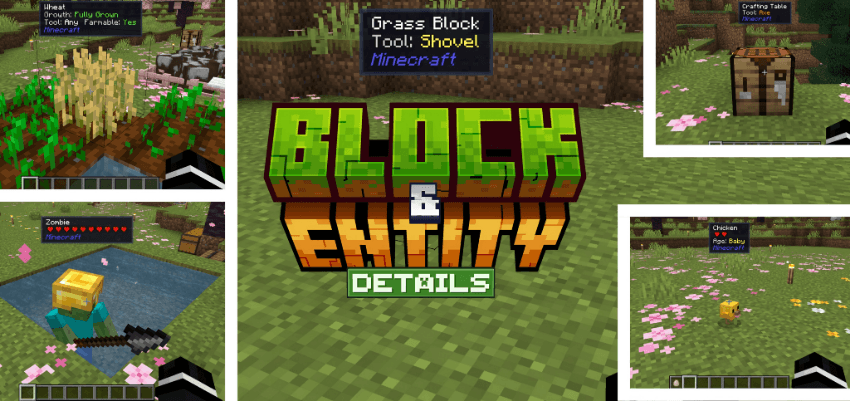
Block & Entity Details enhances Minecraft Bedrock by displaying comprehensive information about any block or entity you look at. Instantly view details such as health, tool requirements, crop growth stages, and more without needing commands or menus. This lightweight addon works seamlessly with all other addons and requires no Beta APIs.
Installation / How to Use
To enable this addon, open or create a world, then navigate to the Behavior Packs section and activate the addon there. The accompanying Resource Pack will be enabled automatically. Once active, simply aim your crosshair at any block, entity, or dropped item to see detailed tooltips appear at the top of your screen. No commands or settings adjustments are necessary.
Requirements / Compatibility
This addon runs on Minecraft Bedrock Edition version 1.21.80 or higher and relies solely on the stable Script API. It is compatible with any other addons you have installed and does not require access to Beta APIs.
Key Features
- Entity Information: Displays name, health (with heart icons), baby and tamed status, tame chance, sitting state, charged creeper status, sheared sheep, llama strength, rideable mob speed, and active potion effects.
- Block Information: Shows name, correct tool type (pickaxe, axe, shovel, hoe, shears), farmable status, crop growth percentage, honey level, composter fill level, cauldron content, candle count, redstone power, door open/closed state, repeater delay, note block note, slab placement, farmland moisture, turtle egg state, end portal frame eye presence, and respawn anchor charge.
- Dropped Items: Reveals name, stack size, custom display name, and enchantments.
- Universal crop growth detection that is not hardcoded, ensuring compatibility with all addons.
- Custom pixel-art heart icons for health display, mirroring vanilla Minecraft style.
- Numeric health display for high-HP mobs such as the Warden and Ender Dragon.
- Namespace indicator showing the addon origin of each block or entity.
- Efficient, single-script design that runs every tick without causing lag.
Notes / Troubleshooting
This addon does not appear in the main Packs menu under Settings. Activation must be done within the world’s Behavior Packs section. If you do not see the tooltip, ensure the addon is enabled in the correct place and that your game version meets the minimum requirement.
 5.00/5
Does it support Chinese?