Advanced Container
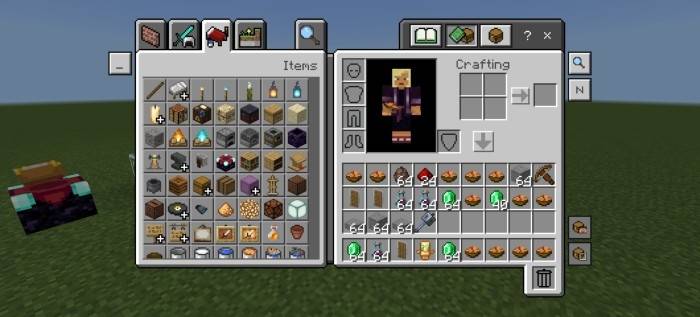
Advanced Container enhances your inventory management by allowing faster and more efficient item handling in Minecraft Bedrock Edition. This tool offers features such as quick crafting, easy item destruction in creative mode, and intelligent item highlighting. With multiple modes and a search function, organizing and transferring items becomes seamless.
Installation
Import the Advanced Container texture pack into your Minecraft Bedrock Edition. Activate it through the resource pack settings to enable its features in your gameplay.
How to Use
- Quick Craft/Trade: Double press on an item to craft or trade all quantities of that item instantly.
- Destroy Item: In creative mode, select an item and press the destroy slot to remove it from your inventory.
- Item Highlighter Search Bar: Use the search bar to find items by name; search is case sensitive.
- Selected Item Highlighter: Selecting an item highlights all identical items in your inventory.
- Quick Mode Switcher: Press the 'N' key to cycle through modes: auto place, drop, and normal.
- Container Button: Available in auto place or drop mode to quickly transfer items. Exercise caution when using drop mode to avoid accidental item loss.
- Smart Auto Place: After searching for items, use auto place or drop mode to move or drop the highlighted items efficiently.
Requirements / Compatibility
No additional settings or subpacks are necessary to use Advanced Container. It is designed to work seamlessly with standard Minecraft Bedrock Edition setups.
Key Features
- Fast crafting and trading with double press functionality.
- Item destruction support in creative mode.
- Search bar with case-sensitive item filtering.
- Highlighting of selected items for easier inventory management.
- Mode switching for auto placing or dropping items.
- Smart container button for quick item transfer.
Notes / Troubleshooting
There are no known issues at this time. Use drop mode carefully to prevent unintentional item loss.