GTV | FERRARI CARS
GTV | FERRARI CARS brings a collection of meticulously crafted Ferrari vehicles to Minecraft Bedrock Edition. This addon offers realistic driving with features such as glowing headlights, customizable paint jobs, a genuine fueling system, gradual acceleration, a speedometer, detailed animations, engine upgrades, and an in-game shop.
Key Features
- Smooth Acceleration: Vehicles accelerate progressively, delivering a lifelike driving feel.
- Manual Gear System: Shift gears manually by hitting while seated in the vehicle.
- RPM Display: The speedometer includes an RPM bar reflecting engine revolutions for immersive feedback.
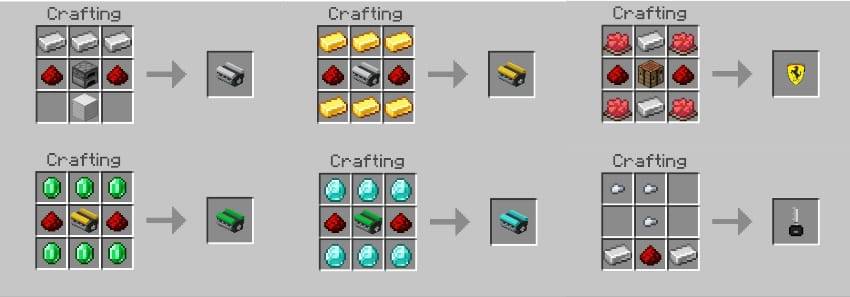
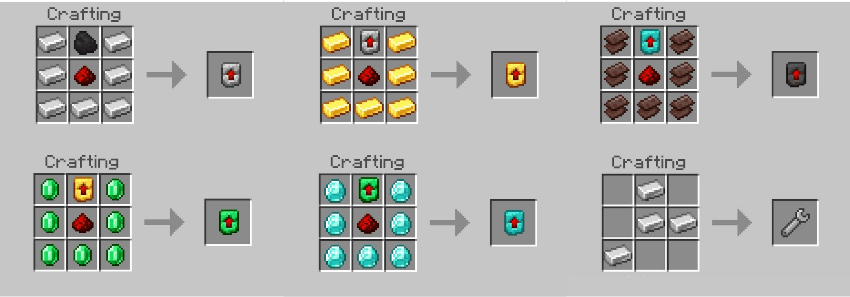
- Engine Upgrades: Enhance your car's performance with engine stage upgrades that boost top speed and acceleration, applied using special engine items.
- Vehicle Removal: Use the Wrench item to despawn vehicles.
- Authentic Sounds: Each vehicle features realistic engine and driving sound effects.
- Ignition Key: Start vehicles only from inside using a key item.
- Fuel System: Vehicles consume fuel types such as Coal (combustion), Redstone (electric), or Hybrid (both). Fuel usage depends on distance and speed.
- Speedometer: Displays current speed (km/h), RPM, and fuel level.
- Emissive Headlights: Headlights emit light and can be toggled on or off while driving.
- Mob Collision: Vehicles can collide with mobs, dealing damage scaled by speed.
- Custom Colors: Paint your car using any Minecraft dye.
- Shop System: Purchase vehicles using iron ingots combined with required engine items.
Special Animations
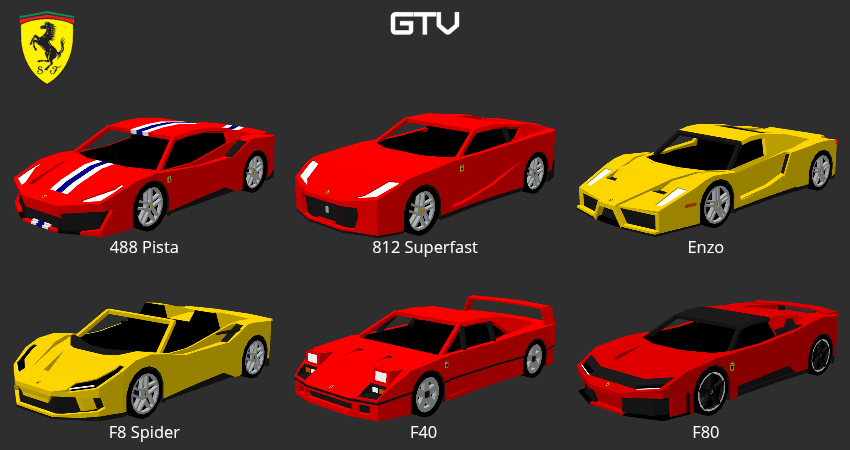
- Ferrari F8 Spider: Features an operable convertible roof; crouch outside with the key to open or close it.
- Ferrari F40: Includes functional pop-up headlights that raise when lights are on and retract when off.
How to Use
Fueling: Before driving, fill the vehicle's fuel tank by holding Coal or Redstone and interacting with the vehicle. Ensure the vehicle is off while refueling.
Starting the Car: Hold the key item and interact with the vehicle to access the "Start" option.
Driving: Once started, remove the key from your hand and drive normally.
Gear Shifting: Hit while seated to change gears.
Turning Off: Hold the key and interact with the vehicle to select the "Stop" option.
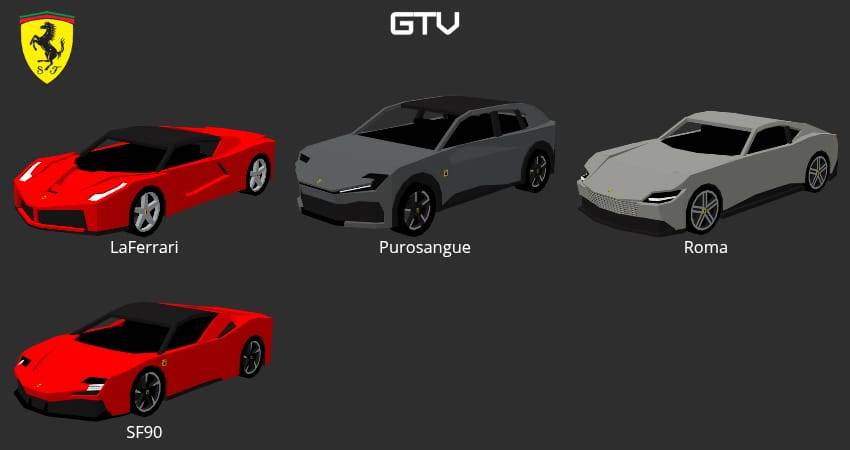
Vehicles
Crafting Recipes