Dma’s Framed Blocks
Dma's Framed Blocks offers an extensive collection of over 300 vanilla Minecraft textures compatible with 12 unique framed block shapes. This add-on enhances building creativity by allowing you to customize framed blocks with nearly all full block textures available in the game. It supports texture pack compatibility, letting you apply your favorite textures seamlessly.
Installation / How to use
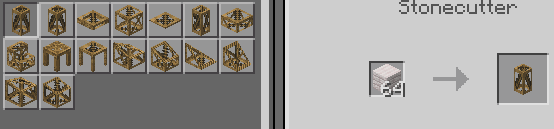
To craft framed blocks, use the Stonecutter with any type of planks, including custom woods tagged as "minecraft:planks." Once crafted, you can customize the texture of a framed block by interacting with it while holding the block whose texture you want to apply. Breaking or replacing the texture will return the original block used for texturing.
Requirements / Compatibility
Key features
- More than 300 textures available to apply
- 12 different framed block shapes:
- Tall Wedge
- Tall Corner Wedge
- Medium Wedge
- Medium Corner Wedge
- Small Wedge
- Small Corner Wedge
- Slabs
- Stairs
- Panel
- Pillar
- Corner Pillar
- Half Slabs
- Supports all planks, including custom wood types with the proper tag
- Expands building options with enhanced shapes and textures
Notes / Troubleshooting
Before the full release, some blocks may be removed or experience changes in functionality. Older versions of the add-on have been archived. Ensure you enable the required experimental features for full compatibility.