
Proximity Voice Chat&Proximity Text Chat
22.02.2026
Proximity Voice Chat & Proximity Text Chat introduce an immersive way to communicate in Minecraft Bedrock by allowing players to hear and see chat messages from nearby participants, mimicking real-life proximity interactions. This feature enhances multiplayer experiences by using spatial audio and customizable chat ranges, similar to voice chat mods available in Minecraft Java Edition.
Installation
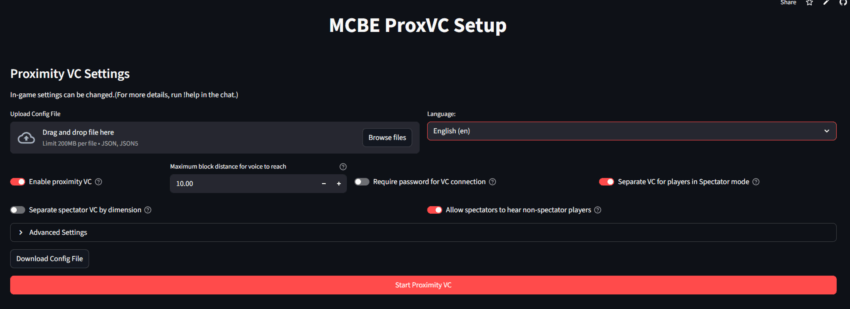
To enable Proximity Text Chat (TC), make sure to activate the Beta APIs in your Minecraft Bedrock settings. For Proximity Voice Chat (VC), setup is streamlined via a web interface where you select preferences and start the service with minimal effort.
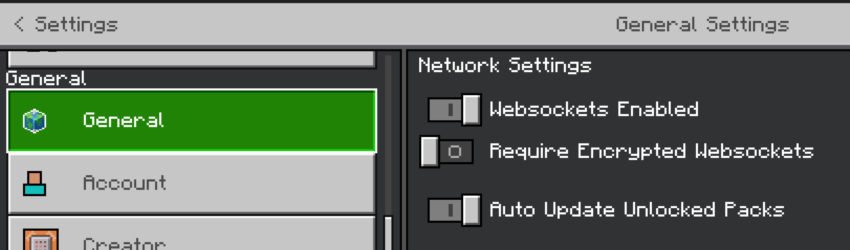
For voice chat, after enabling necessary settings in your Minecraft world (including “Websockets Enabled” and disabling “Require Encrypted WebSockets” if on version 1.21.60 or later), execute the provided command within the game to activate proximity voice chat functionality.
How to Use
Proximity Text Chat Commands:
!help– Shows available commands and usage.!lang <ja/en>– Switches chat language between Japanese and English.!dis <number>– Adjusts the text chat range to define how far messages can be seen.!ptc <true/false>– Turns proximity text chat on or off.
Joining a Voice Chat Session:
- Visit the designated connection page. The Room ID will be automatically filled if accessed via the setup URL.
- Enter your Minecraft Gamertag and the Room ID displayed during setup, then connect to the voice chat.
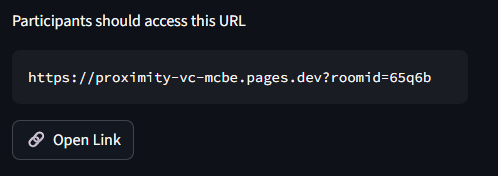
Once connected, your spatial audio will reflect player positions in the game world. Volume controls are available on iPhone, and spectator-specific settings can be configured.
Requirements / Compatibility
- Minecraft Bedrock Edition with Beta APIs enabled for Proximity Text Chat.
- For Proximity Voice Chat, “Websockets Enabled” must be turned on in the world settings (version 1.21.60 or later).
- Ensure “Require Encrypted WebSockets” is disabled to allow proper voice communication.
- For server use, set
op-permission-level=4inserver.propertiesto grant necessary command permissions.
Key Features
- Spatial audio support adjusts sound direction based on player location.
- Simple web-based configuration for voice chat setup.
- Volume control available on iPhone devices.
- Multilingual support with language switching commands.
- Customizable chat range for text messages.
- Options to configure spectator audio behavior.
Notes / Troubleshooting
- If audio is inaudible or players can be heard from unrealistic distances, try leaving the voice chat session and reconnecting.
- On iPhones, prevent the device from entering sleep mode during voice chat sessions to maintain connection quality.
- For microphone issues on mobile devices when running Minecraft and voice chat simultaneously:
- iPhone: Open Minecraft, then connect to voice chat via browser, and finally re-enter Minecraft.
- Android: Use the dedicated app for better compatibility.
proximity_tc_en-1.0.6.mcpack
[68.3 KB]

