
Bedrock Performance Optimizer
UPDATED: 2.07.2026
Bedrock Performance Optimizer enhances your Minecraft Bedrock experience by improving game performance without sacrificing visual quality. This addon includes customizable settings to tailor optimization according to your preferences. It works seamlessly across all platforms without requiring experimental game features.
Installation / How to use
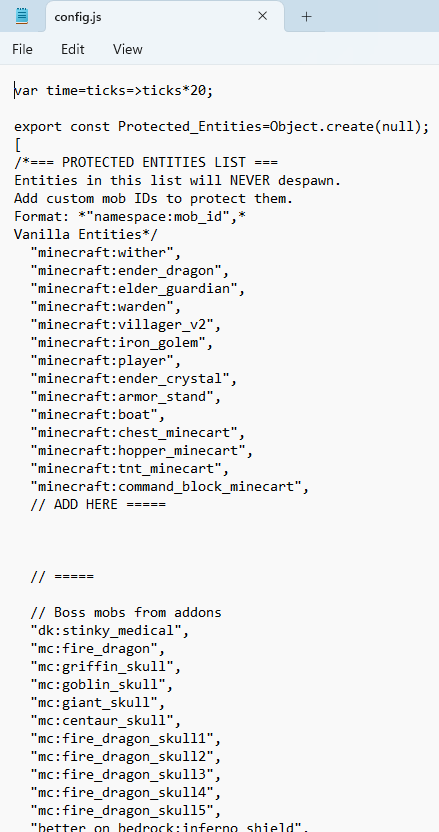
Install the addon by placing the provided files into your Minecraft resource and behavior packs folders. Once activated in your world settings, the addon will automatically optimize entity despawning, item merging, particle effects, and certain game logic processes. Adjust the included configuration file to customize which entities are exempt from despawning or to fine-tune other performance options.
Requirements / Compatibility
This addon is compatible with all Bedrock Edition platforms and does not interfere with achievements. It is designed to operate without the need for experimental gameplay settings. The despawn system supports popular mod addons, ensuring no important mobs are unintentionally removed.
Key features
- Enhanced Entity Despawn: Mobs that are distant or off-screen despawn faster to free up resources. Loaded chunk mobs despawn after 3 minutes and 20 seconds, preventing sudden disappearances near the player. Bosses, tamed animals, and nametagged entities remain unaffected.
- Configurable Entity Blacklist: Customize which mobs are protected from despawning by editing the configuration file included with the addon.
- Item Merging: Dropped items will automatically cluster together to reduce item count and improve performance, while XP orbs remain separate for gameplay balance.
- Optimized Particle Effects: Particle counts are reduced subtly to improve frame rates without noticeable visual impact, such as halving crit hit particle emissions.
- Optimized Game Logic: Falling gravel despawns after 10 seconds if it remains in motion, preventing unnecessary entity buildup.
Notes / Troubleshooting
If you experience mobs disappearing too close to you, consider increasing your world simulation distance in the game settings, as this behavior is not caused by the addon.


Performance Optimizer v2.6.1
[212.81 KB]

 3.00/5