
Crosshair Indicator
20.03.2026
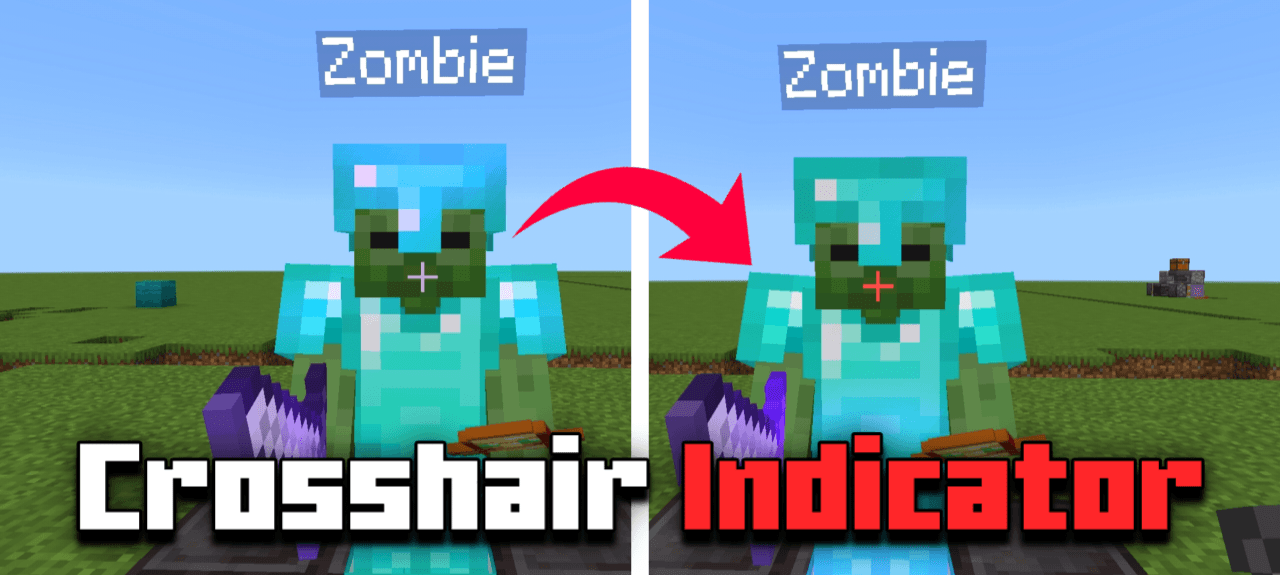
Crosshair Indicator is a texture pack that enhances gameplay by changing the crosshair color to red when aiming at a player or mob within attack range. This visual cue helps players know precisely when they can hit a target, improving combat accuracy and timing.
Key Features
- The crosshair shifts to red upon targeting a mob or player, providing an immediate hit indicator.
- Works seamlessly with custom crosshairs without requiring manual adjustments.
- Designed for broad compatibility with other resource packs.
Installation
To install the Crosshair Indicator pack, simply download the resource pack file and add it to your Minecraft Bedrock Edition resource packs folder. Activate the pack in your world settings before starting your game session.
How to Use
Once enabled, the crosshair will automatically change color when you look directly at a mob or player within striking distance. No additional setup is necessary.
Requirements / Compatibility
This pack works with any Minecraft Bedrock Edition version that supports resource packs. It is compatible with most other packs and custom crosshairs, allowing you to maintain your preferred visual style.
Usage Permissions
- You may modify the pack for personal use only.
- Reviews of the pack are permitted as long as original download sources are credited.
Restrictions
- Redistributing modified versions of the pack publicly is prohibited.
- Uploading or sharing the pack on unauthorized websites is not allowed.
- Sharing download links from unofficial sources is forbidden.
Crosshair Indicator v1.0.1.mcpack
[55.83 KB]

