Backpack Plus Addon
17.03.2026
Backpack Plus Addon enhances your Minecraft Bedrock experience by adding versatile backpacks similar to those found in Java mods. This addon allows you to carry more items without cluttering your main inventory, making exploration and resource gathering much easier.
How to Use
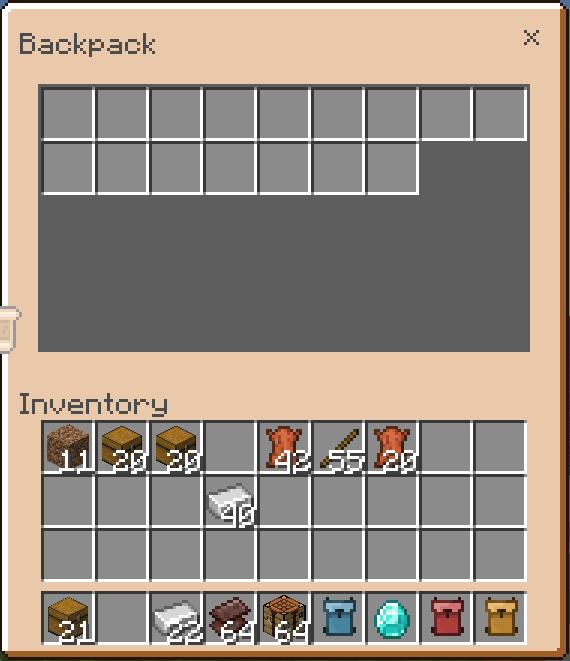
Equip a backpack in your main hand to access its storage. On PC, right-click while holding the backpack to open its inventory. On mobile devices, tap the “open” button or long-press the screen while holding the backpack. Both platforms share the same intuitive backpack interface.
Key Features
- Multiple backpack sizes: Small (16 slots), Medium (32 slots), Big (42 slots), and Extra Big (63 slots).
- Each backpack’s contents are saved individually, allowing you to share backpacks with other players without losing items.
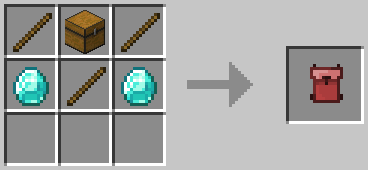
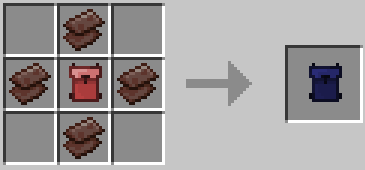
- Crafting recipes for each backpack size, enabling easy upgrades.
- Comprehensive set of commands to manage backpacks and their contents efficiently.
Crafting Recipes
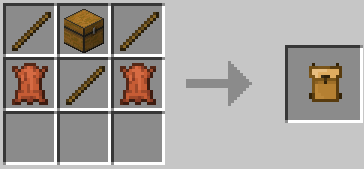
Small Backpack (16 slots):
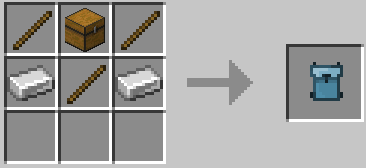
Medium Backpack (32 slots):
Big Backpack (42 slots):
Extra Big Backpack (63 slots):
Important: Do not upgrade an existing Big Backpack containing items, as the contents will not transfer.
Backpack Commands
/scriptevent bps:reset– Resets the backpack you are currently holding./scriptevent bps:clear bp– Removes all backpacks and recovers items./scriptevent bps:see <ID>– View the contents of a specific backpack by ID./scriptevent bps:retrieve <ID>– Retrieve items from a backpack by its ID./scriptevent bps:set <ID>– Assign a specific backpack ID to your current backpack./scriptevent bps:delete <ID>– Delete a backpack and its saved items./scriptevent bps:clean– Remove all empty backpack entities./scriptevent bps:sudo <PlayerName> <Command>– Execute a backpack command as another player./scriptevent bps:list– Display all backpack IDs.
Note: Replace <ID> with the backpack’s unique ID number found on the item. For example, /scriptevent bps:see 9004.
Notes and Troubleshooting
- Enable the Backpack Plus resource pack in your world settings to ensure proper visuals and functionality.
- If the backpack UI does not display correctly, another resource pack may be conflicting. Move the Backpack Plus resource pack to the highest priority in the resource pack list.
- Always back up your world before updating or installing new versions of the addon.
- Avoid using the
/killcommand in your world, as it may cause backpack data corruption.
Improved Backpack Addon 1.21.123+ V3.9.mcaddon
[114.87 KB]

